Ghostwriter v4+ provides options for managing user sessions. Previous Ghostwriter releases used Django’s defaults for session management. While these defaults are not inherently bad, they are permissive for applications storing sensitive information. There are several options an administrator can change to secure user sessions to their liking.Documentation Index
Fetch the complete documentation index at: https://specterops-2-feature-scoped-api-tokens.mintlify.app/llms.txt
Use this file to discover all available pages before exploring further.
Managing Session Expiry & Cookies
The default Django sessions expire after two weeks. Ghostwriter tightens this by default, and administrators have control over three essential values:-
DJANGO_SESSION_COOKIE_AGE- Sets the number of seconds a session cookie will last before expiring. The Ghostwriter CLI writes 32400 seconds, or nine hours, to the generated
.envfile. If the environment variable is missing, Django falls back to 7200 seconds, or two hours.
- Sets the number of seconds a session cookie will last before expiring. The Ghostwriter CLI writes 32400 seconds, or nine hours, to the generated
-
DJANGO_SESSION_SAVE_EVERY_REQUEST- Sets whether the session cookie will refresh on every request (default: true)
-
DJANGO_SESSION_EXPIRE_AT_BROWSER_CLOSE- Sets whether the session cookie will expire when the browser is closed (default: true)
DJANGO_SESSION_SAVE_EVERY_REQUEST set to true, the server will update the session with each request. Updates reset the expiration, so a short expiry period won’t log out anyone actively using Ghostwriter but will allow inactive sessions to expire.
If set to true, the last option will expire sessions after the browser quits. However, whether the session ends when you close the browser window depends on the browser. Some browsers, like Chrome, will keep sessions active, so you may need to quit or exit the browser to end the session versus just closing the browser window.
You can manage these values via the Ghostwriter command-line interface (CLI) tool.
Cleaning Up Expired Sessions
Finally, administrators can view sessions in the admin panel under the Sessions section. This section records every session currently known to Ghostwriter, including expired sessions. If a user does not log out (e.g., lets their session expire) their session will remain logged in the database. Ghostwriter also tracks JWT sessions created by the GraphQLlogin mutation. These rows allow administrators to revoke login JWTs before their exp timestamp, but expired rows should still be cleaned up periodically.
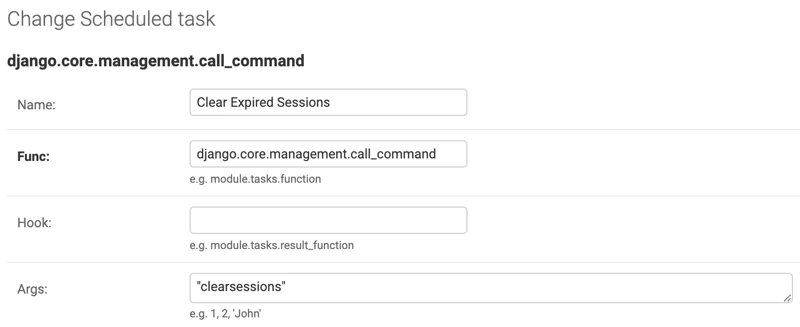
It is recommended you clear expired sessions on a regular basis to keep the session tables tidy. Use the clear_expired_sessions management command for this cleanup. The command wraps Django’s built-in clearsessions command and also deletes expired GraphQL login sessions from Ghostwriter’s UserSession table.
For a scheduled task, call django.core.management.call_command and pass "clear_expired_sessions" as its only argument. Set up a task like this one that runs daily with the cron scheduler. For example, 0 5 * * * will run it every day at 5:00 AM.