

Accessing the data in your report template is simple. Everything is inside theDocumentation Index
Fetch the complete documentation index at: https://specterops-2-feature-scoped-api-tokens.mintlify.app/llms.txt
Use this file to discover all available pages before exploring further.
bloodhound key in the report context.
You can preview this by looking at the JSON report data.
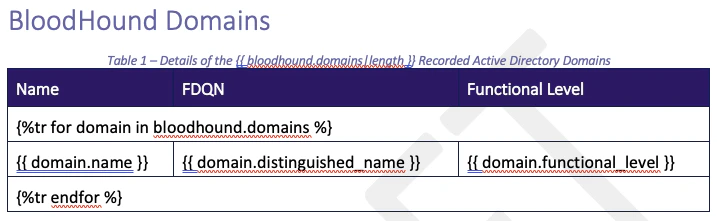
Inside the bloodhound key, you will find a domains key and, if it’s BloodHound ENterprise data, a findings key.
For example, you can iterate over the domains to create a table like so
Report Filters for BloodHound Data
| Filter | Usage |
|---|---|
translate_domain_sid(SID, domains) | Accepts the bloodhound.domains dict and a SID to translate the SID to a domain name. |
filter_bhe_findings_by_domain(findings, SID) | Accepts the bloodhound.findings dict and a SID to return only findings for that domain SID (based on the findings environment_id.) |