

Collaborative editing is the star of the show, but the editor contains other features worth exploring.Documentation Index
Fetch the complete documentation index at: https://specterops-2-feature-scoped-api-tokens.mintlify.app/llms.txt
Use this file to discover all available pages before exploring further.
Inserting Objects
The editor supports inserting objects that make it easier to visualize certain elements of your writing, such as captions and evidence files.Inserting Evidence
You can insert your uploaded evidence files by clicking the paperclip in the menu bar. A window will appear with options to select an existing piece of evidence from a list or upload a new piece of evidence. After inserting your evidence, a preview block will appear in the editor so you can see the evidence you have inserted and understand how it will look in line with your other content.Inserting Captions
You can insert a caption by clicking the hamburger menu and then Insert Caption. The form will ask you to enter a reference name. A custom reference name is optional, but you will want one if you plan to create a reference/bookmark to your caption later. After inserting the caption, you will edit the text field to supply the contents of your caption.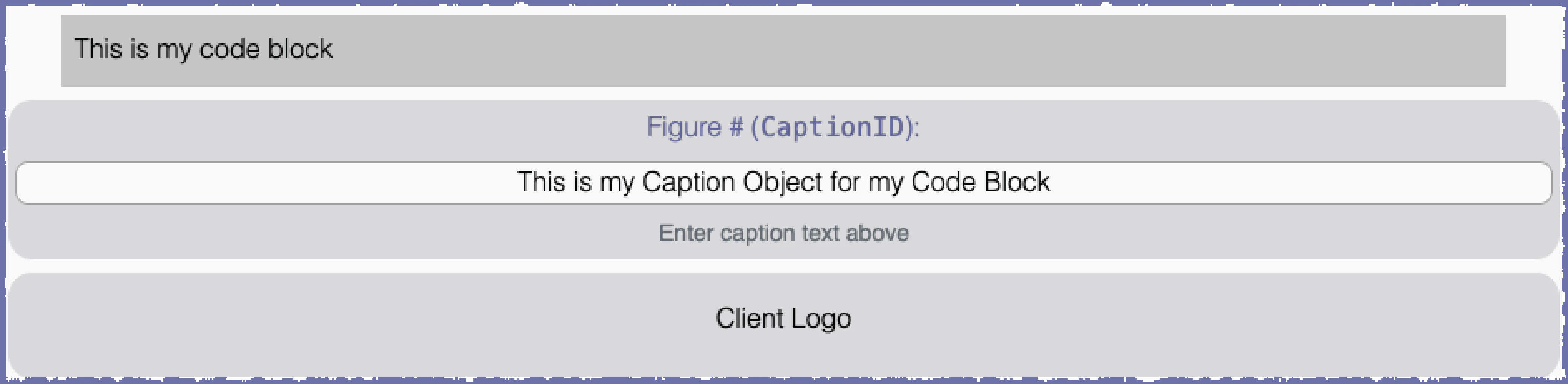
Passive Voice Checking
The Ghostwriter image ships with a local copy of the English spaCy model, a natural language processor with the capability to detect passive voice. Editors often have to flag instances of passive voice when reviewing reports written in languages such as English. Language processing happens on demand.Performing a Passive Voice Check
Click the hamburger menu and then Check Passive Voice. The local spaCy model will review the text and try to highlight any instances of passive voice. The model has about 95% accuracy.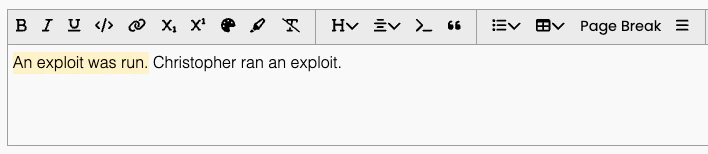
Changing the Language
Ghostwriter ships withen_core_web_sm. You can change the language model using Ghostwriter CLI. SpaCy offers trained pipelines for a couple dozen languages and an option
for a multi-language model.
After you change the model, bring the containers down and back up. Ghostwriter will check if your desired model is downloaded at runtime.
If the model is not downloaded, such as when you have just changed it, it will download the model. This adds a one-time delay of about 20-30 seconds
to the service’s start time.